
ESP
Track Every Killer Move with Dead by Daylight ESP Options
Dead by Daylight ESP is three lists in one overlay: Survivor ESP, Killer ESP, and Objects ESP. You track the killer, hunt the squad, and find generators, hooks, and hatch without guessing through the Fog.
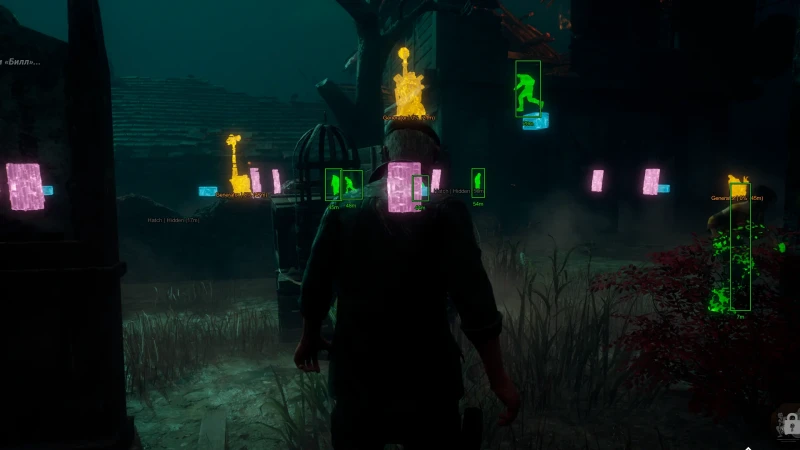
Start with Survivor ESP options
If you queue survivor, Survivor ESP is how you track every killer move. You see where the threat is, how far, and which way they look. That is the difference between holding a gen and pre-running a pallet.
Turn on only what you will read at a glance. A maxed HUD is slower than a quiet one. Full toggles also live on Features.
Boxes, fill, and skeleton
Bounding box can be a full box or corners. Fill can be static or gradient. Skeleton thickness is the bone overlay. Corners plus a thin skeleton stay readable behind trees. Full filled boxes are loud. Use them while you learn, then thin them down.
Identity and health
Nickname, character name, character level, and prestige level tell you who is in the trial. Health state is the one you want in a chase. Distance sits next to the box so you stop spinning on a teammate who is already downed.
View line and line to enemy
View line shows facing. Line to enemy draws the path between you and the killer. Together they stop you vaulting into a lunge you should have seen. If the screen feels busy, keep distance and health and drop the extra lines.
Hunt survivors down with Killer ESP options
Killer ESP is the other role. You hunt all four survivors instead of guessing which gen is real. Boxes, health, and distance on the squad tell you who is injured, who is on a heal, and who is walking into a bad tile.
Patrol with object reads on. Killer ESP without generators is still hide-and-seek. Killer ESP plus gen states is map pressure. Save this as a separate config from your survivor profile.
Locate generators and hatches with Objects ESP
Objects ESP is the map layer. Show state and show distance on each prop. Then pick the objects you actually play around.
Objectives
Generators and escape doors are the win condition. Hatch is the late-game out. Meat hooks are the killer win condition. Keep these four on for almost every config.
Loop tools
Pallets, windows, and closets decide chases. Totems and traps matter on hex and trapper-style maps. Chests are extra. If the HUD clutters, drop chests first, then closets.
How to load ESP without drowning the HUD
Survivor config: killer box, health, distance, generators, hooks, hatch. Killer config: squad boxes, health, generators, pallets, hooks. Add aim later from the aimbot options guide. Add repair help from the skill check helper.
That split is the ESP core inside dead by daylight cheats on Windows PC. Save and share those two profiles in the menu and config post so you are not rebuilding boxes every queue.
FAQ
What is Dead by Daylight ESP?
ESP draws players and objects through the Fog. Survivor ESP tracks the killer. Killer ESP tracks the squad. Objects ESP marks generators, hooks, pallets, hatch, and the rest of the map list.
Which ESP toggles should I enable first?
Health, distance, generators, hooks, and hatch. Add boxes or skeleton next. Add names, prestige, and fill last. A short list is faster in a chase than a full billboard.
Do I need a different ESP config for killer and survivor?
Yes. Survivor wants the killer and the objectives. Killer wants all four survivors and gen states. Save two configs and swap with the menu key.
Is object ESP only for hatch?
No. Hatch is one toggle. Generators, escape doors, meat hooks, pallets, windows, closets, chests, totems, and traps each have their own line. State and distance apply across them.
Can ESP replace Windows of Opportunity?
Object ESP can show pallets and windows too. Kate’s perk still helps if you play without an overlay. Many people run a thin pallet toggle plus the perk until the map is in muscle memory.